Frameit Video Editor
- 4.3
- Rating
- 50.00K
- Installs
- Free
- Price

 Analysis by App-foxy
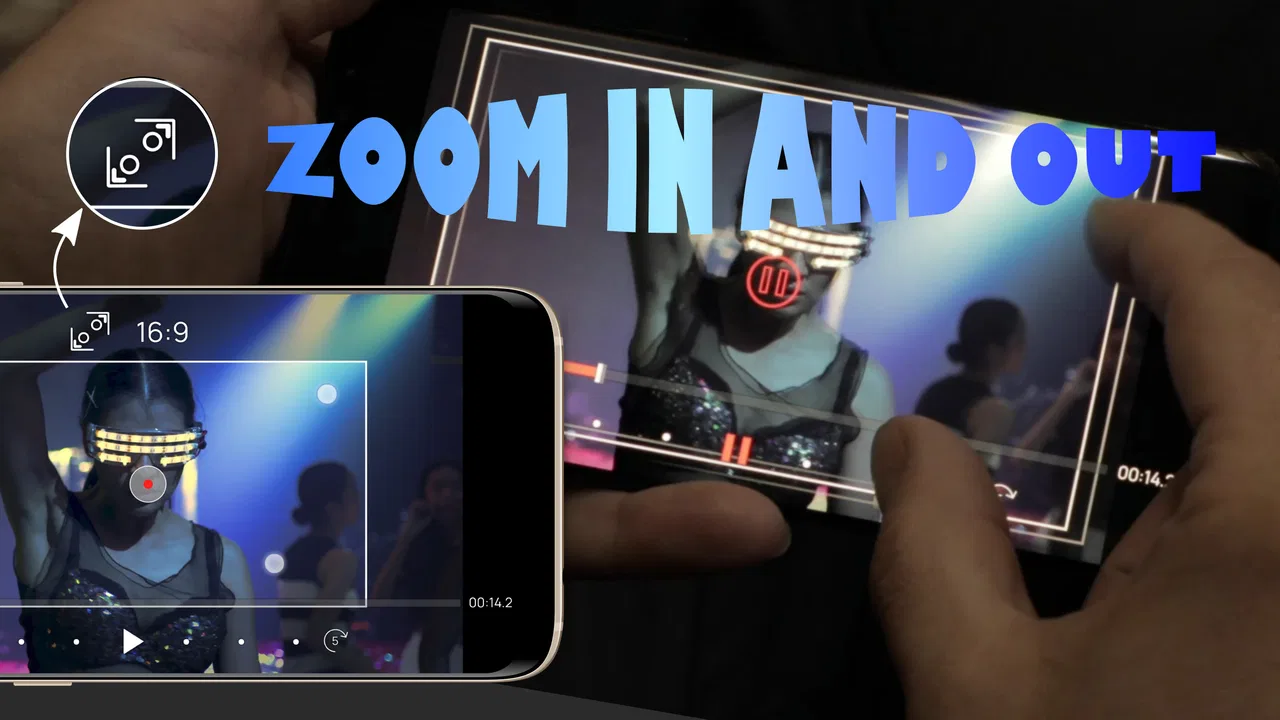
I like video editors that solve one visual problem well instead of burying a simple task under a crowded timeline. Frameit Video Editor takes that focused approach. It is built around moving the view inside a clip: panning across the image, zooming toward a detail, or rotating the frame to create a more active result. After spending time with it, I see its main appeal clearly: it is less about replacing a full production suite and more about giving ordinary footage a deliberate sense of movement.
That makes it interesting for anyone who records short social posts, product demonstrations, travel clips, screenshots, or simple presentations. A still-looking recording can feel much more intentional when the viewer is guided toward the important area. The controls are approachable enough for casual editing, while the effect itself has enough room for careful adjustment. The strongest reason to try it is its narrow focus on motion inside the frame, not a promise to handle every possible editing job.
How the motion-focused workflow feels in everyday use
The app sits in the video players and editors category and comes from FIGABYTE SOLUTIONS d.o.o. It is free to install, carries an Everyone age rating, and is available for devices running Android 7.0 or later. Its current version is 1.07.2. Those details make it accessible to a broad range of Android users, especially people who want to experiment before committing money to a more complex editor.
You May Also Like

 Pandora - Music & Podcasts
Pandora’s Music Is Easy to Start, but Harder to Recover
Pandora’s strength is its low-effort path from a seed to a station. Its weak spot is how much confidence it asks you to place in connection, setup, and quiet recovery.

 AccuWeather: Weather Radar
AccuWeather Review: A Quick, Clear Forecast for Everyday Decisions
For everyday plans, the best forecast is the one you can understand quickly. AccuWeather makes rain timing, radar, and local conditions easy to act on, with a few trade-offs.

 Hill Climb Racing
Why Hill Climb Racing Still Turns Crashes Into One More Run
A tiny car, a bumpy hill and one more upgrade: Hill Climb Racing keeps resurfacing because its simple chaos makes every near-miss feel personal.

 AliExpress - Shopping App
AliExpress Makes Global Shopping Feel Personal, but Shoppers Bear the Risk
AliExpress turns a global marketplace into a pocket-sized discovery engine. Its reach is useful, its shopping loop compelling, and its trade-offs easy to miss.

 Lords Mobile: Kingdom Wars
Lords Mobile Is a Kingdom-Building Routine, Not a Quick Match
A case-by-case verdict on the building, battles, device demands, and social commitments that make Lords Mobile rewarding for some players and exhausting for others.

 PDF Scanner app - TapScanner
TapScanner Makes Paperwork Easier to Capture, Check, and Share
TapScanner makes scanning with a phone feel less like a rescue operation and more like a dependable step in getting work done. Its capture tools are useful, though not flawless.
More From Our News Desk
View All News


The basic idea is easy to understand. I can take a clip and shape how the visible area changes over time. A pan can move attention from one side to another, a zoom can bring the viewer closer to a subject, and a rotation can add a deliberate change in orientation. Used together, these effects can make a static composition feel more like a guided camera movement, even though the original recording was fixed.
That distinction matters. This is not the same as physically moving a camera while recording. The result depends on the quality, framing, and available space in the original footage. If a clip is already tightly cropped, an aggressive zoom will quickly look uncomfortable. If the subject is near an edge, a pan may reveal unwanted empty space. The app gives you control over the movement, but good results still come from making modest decisions.
My preferred workflow is to begin with the least dramatic version of an effect. I first watch the untouched clip and decide what the viewer should notice. Then I add a small movement toward that point rather than immediately applying a large zoom or fast rotation. This creates a useful editing habit: the effect supports the subject instead of becoming the subject.
A realistic example would be a short clip of a handmade item on a desk. Rather than filming several close-ups, I could let the opening show the whole object, slowly move toward a particular detail, and finish with a slight pan across its surface. That is a practical use of Frameit Video Editor because the motion has a clear purpose. It can also help with screen recordings, where guiding the viewer toward one button or section is more helpful than showing the entire display at once.
Speed expectations depend on the kind of edit
For a simple clip with one or two controlled movements, the experience should feel more direct than working inside a large editor filled with layers, transitions, audio tracks, and correction panels. The focused design reduces the number of creative decisions competing for attention. I can concentrate on the path of the frame instead of spending time searching through a long effects menu.
That does not mean every project will feel equally quick. Video editing always becomes more demanding as clips grow longer, source quality rises, or several changes are combined. A short social clip is a natural match for this app. A long recording with repeated movements across many moments requires more patience, because reviewing the whole result becomes part of the work.
One useful speed trick is to decide the movement before adjusting its intensity. I set the starting view, choose the destination, and only then refine how noticeable the transition should be. This prevents the common cycle of changing zoom, rotation, and position randomly and replaying the same section over and over. The app is most efficient when I treat it as a visual composition tool rather than an effects toy.
Another practical habit is to preview the edit at normal viewing size, not only while zoomed in on the editing controls. A movement that looks subtle in the editor can feel much stronger when the entire clip plays continuously. Checking the complete sequence early helps avoid spending time polishing a transition that later feels too abrupt.
Compared with a usual all-in-one mobile editor, Frameit Video Editor can be faster for this specific task because the interface is centered on dynamic framing. A broader editor is still better when I need captions, music, multiple clips, color adjustments, or a complicated sequence. The trade-off is straightforward: this app reduces clutter by giving up breadth.
Where heavier use can expose friction
The demanding moments are likely to appear when the project asks for constant movement rather than one clear visual change. If every few seconds contains a new pan, zoom, or rotation, the edit becomes harder to judge and more laborious to refine. The problem is not necessarily the controls; it is that too much motion can make the finished video tiring to watch.
I would be especially careful with rotation. A small turn can make a transition feel intentional, while repeated or strong rotation can distract from the subject. It is tempting to combine all three effects because they are available together, but restraint usually produces a more polished result. In my experience, a gentle zoom paired with a controlled pan is easier to watch than a sequence that constantly changes direction.
Longer clips also create a review burden. Even if the edit itself is simple, I need to watch enough of the result to make sure the framing does not drift away from the subject. A short preview can hide an awkward ending or a movement that accelerates at the wrong moment. I recommend checking the beginning, middle, and end separately before treating a project as finished.
There is a useful workflow for heavier edits: divide the creative task into passes. In the first pass, I establish where the viewer should look. In the second, I adjust the scale of the movement. In the third, I check whether rotation adds anything. This is more reliable than trying to perfect every property at once, and it makes the source of a problem easier to identify.
Users should also keep expectations realistic about resource demand. A mobile editor has to process the original video and produce a new result, so demanding footage can take more effort than a small, short clip. I would avoid judging the app solely by how quickly a basic sample behaves. The more material I ask it to inspect and transform, the more important it becomes to use shorter sections while testing the visual idea.
Stability and recovering from an imperfect edit
A good editor is not only about its creative controls; it is also about how comfortably I can correct mistakes. Frameit Video Editor’s focused purpose helps here because there are fewer types of changes to track. If the result looks wrong, I usually know to inspect the movement path, the scale, or the rotation rather than searching through unrelated layers.
My safest approach is to make one meaningful change at a time and preview it immediately. If a zoom and a rotation are changed together, it becomes difficult to know which adjustment caused the awkward result. Separating them makes recovery quicker and keeps the project understandable, particularly when I return to it after a break.
I would also save or export a satisfactory version before experimenting with a more dramatic variation whenever the workflow allows it. That is a general editing precaution, but it matters more on a phone, where interruptions, storage pressure, or switching between apps can disrupt concentration. A cautious workflow protects the time already spent on a good composition.
The app has a 4.3 average from around 385 ratings, with roughly 26 written reviews, and it has passed 50 thousand installs. That gives it a visible user base without making it feel like an enormous, universal platform. I read those figures as a sign that the concept is understandable to people who want this particular style of editing, while also reminding myself that a focused tool will not suit every editing habit.
Because the developer is FIGABYTE SOLUTIONS d.o.o., I would pay attention to the version available on my device and keep the app updated when possible. The listed version is 1.07.2, and updates can matter for compatibility and day-to-day behavior. I would not build an important deadline around any mobile editor without first testing the complete workflow on the phone I plan to use.
Device limits and choosing the right phone
The minimum operating-system requirement of Android 7.0 is modest, so the app is not restricted to only recent phones. That is good news for someone using an older but still functional device. However, operating-system compatibility does not tell the whole performance story. A phone may install the app successfully and still feel less comfortable with longer or more demanding video work than a newer model.
For an older device, I would begin with a short clip and a single movement. That test answers the practical questions quickly: does the preview remain comfortable, do the controls respond as expected, and can the finished result be produced without interrupting the workflow? If the answer is yes, the app may be a useful lightweight addition even if the phone is not powerful enough for a large editing suite.
On a newer phone, the main benefit is not simply potential speed. A larger or sharper screen can make it easier to judge whether the subject stays properly framed. That is important because the difference between a smooth pan and a distracting one may be only a small change in position. More screen space also reduces the chance of making adjustments by guesswork.
Storage is another everyday consideration. Editing creates a new video while the original is still useful, so I would leave room for both source and finished files before starting a project. This is especially relevant when testing several versions. Keeping only the final export can save space, but deleting the original too early removes the option to rebuild the movement with a better starting point.
People who mainly edit high-resolution footage, lengthy recordings, or batches of clips may prefer a broader editor on a tablet, computer, or more powerful phone. Frameit Video Editor makes more sense for short, visually focused work where the benefit of a quick framing adjustment outweighs the need for a full post-production environment.
What the free model means for a first try
The app is free, with in-app purchases listed from $1.49 to $21.99 per item. That makes the initial decision fairly easy: I can try the central editing idea before deciding whether any paid option fits my needs. I would still check the purchase screen carefully before confirming anything, especially if I am testing the app casually or handing the phone to a family member.
The free starting point is valuable because the app’s usefulness depends heavily on personal taste. Some people will enjoy shaping movement inside a frame; others will quickly discover that they need text, audio mixing, filters, or multi-clip editing more often. There is no reason to pay for a focused tool until it has proved useful in the kind of videos I actually make.
For a friend asking whether to install it, I would say this: try it with one ordinary clip, not a carefully staged project. Use a recording from a normal day, such as a quick demonstration, a room detail, or a short travel moment. If a modest pan or zoom makes that footage clearer and more interesting, the app has earned a place in your toolkit. If the clip still needs captions, music, trimming, and several layers afterward, a conventional editor will probably be the better home.
Who will appreciate it, and who should skip it
I think Frameit Video Editor is a good fit for beginners who want a visible improvement without learning a complete editing system. It also suits creators who already use another editor but need a quick way to add controlled movement to a clip. A teacher preparing a visual explanation, a small seller showing a product, or a traveler turning a still-looking recording into a more guided sequence could all find a practical use for it.
It is less suitable for someone searching for an all-purpose production app. If your normal workflow depends on multiple video layers, detailed sound work, subtitles, advanced color treatment, or a large collection of transitions, this focused tool may leave you switching between applications. That extra step can erase the time saved by its simpler approach.
I would also skip it for projects where the original footage has already been framed perfectly and should remain untouched. Dynamic motion is not automatically an improvement. Interviews, instructional material, or calm documentary clips may benefit from stability rather than constant movement. The app is most effective when motion clarifies structure, highlights detail, or gives a static shot a reason to keep the viewer’s attention.
One less obvious use is preparing several versions of the same idea for different placements. A single source clip can be explored with a wider opening, a closer emphasis, or a slightly different direction of movement. That can help decide which framing communicates best before committing to a final edit elsewhere. The important point is to keep the variations purposeful instead of producing many nearly identical exports.
My performance verdict after weighing the trade-offs
Frameit Video Editor feels like a specialist rather than a replacement for every other mobile editor. Its perceived speed comes from its narrow job: dynamic pan, zoom, and rotation are the center of attention, so I am not navigating a full production desk to make one framing change. For short clips and clear visual goals, that focus is genuinely useful.
Its limits appear when the project becomes long, crowded, or dependent on features outside motion framing. Heavy use requires sensible previewing, careful storage management, and a willingness to keep effects restrained. Older devices can still be worth testing because the minimum requirement is Android 7.0, but I would begin with a small project before trusting it with a large batch.
The app is free to start, rated for Everyone, and has enough adoption to make it a reasonable experiment rather than an obscure gamble. The optional purchases mean I would review the available choices before spending, but the basic decision is simple: does controlled movement solve a real problem in my videos?
My recommendation is to install it when your footage needs guided motion, not when you need a complete editing studio. I would use it for a focused pan toward a detail, a restrained zoom that improves a demonstration, or a carefully timed rotation that gives a short clip personality. When those are the jobs in front of me, its focused design is an advantage. When they are not, a broader editor will save me from moving the project between tools.
FAQs for Frameit Video Editor
01What is Frameit Video Editor used for?
Frameit Video Editor is designed for creating and editing short videos with decorative frames, layouts, borders, and visual effects. It can be useful for preparing social media posts, promotional clips, photo montages, and personal projects. Before downloading, keep in mind that the available tools, templates, and export options may vary depending on your device, app version, and whether you use the free or premium features.
02Is Frameit Video Editor suitable for beginners?
Yes, Frameit Video Editor is generally aimed at casual users who want to improve videos without learning complicated professional editing software. Its frame-based approach and straightforward editing controls make it relatively easy to experiment with images, clips, text, and visual arrangements. However, users looking for advanced timeline editing, detailed color correction, or professional audio mixing may find its feature set more limited.
03Can videos created with Frameit Video Editor be shared on social media?
The app is intended for creating content that can be saved and shared, making it suitable for platforms such as Instagram, TikTok, Facebook, and messaging services. Export quality, aspect ratios, resolution, and watermark behavior may depend on the selected template or subscription plan. It is advisable to review the export preview before saving, especially when creating content for a specific social media format.
04Does Frameit Video Editor include in-app purchases or advertisements?
Frameit Video Editor may offer a combination of free tools and optional paid content, such as premium frames, templates, effects, or an ad-free experience. Some functions could also be restricted until you upgrade. Because pricing and availability can change with updates, check the current store listing and the purchase screen carefully before confirming payment. Also review subscription terms if recurring billing is offered.
05What permissions does Frameit Video Editor require?
To edit personal media, Frameit Video Editor may request access to photos, videos, and device storage, while certain sharing or recording features may require additional permissions such as the camera or microphone. These permissions should match the functions you intend to use. On Android and iOS, you can review or change access in the device settings, and you may deny optional permissions if they are not necessary for your editing workflow.
Pros
- Simple interface makes basic video editing quick to learn.
- Offers creative frames and layouts for social media content.
- Useful text and sticker tools for personalizing clips.
- Previewing edits before saving helps avoid unwanted changes.
- Suitable for short projects and casual mobile editing.
Cons
- Some frames and editing assets may require in-app purchases.
- Export options can be limited compared with professional editors.
- Complex projects may feel slow on older devices.
- Watermarks may appear depending on the selected template.
- Advanced audio and timeline controls are relatively limited.

Frameit Video Editor
Gallery